Flutter State Management Explained: Provider vs Riverpod vs Bloc

Flutter State Management Explained: Provider vs Riverpod vs Bloc
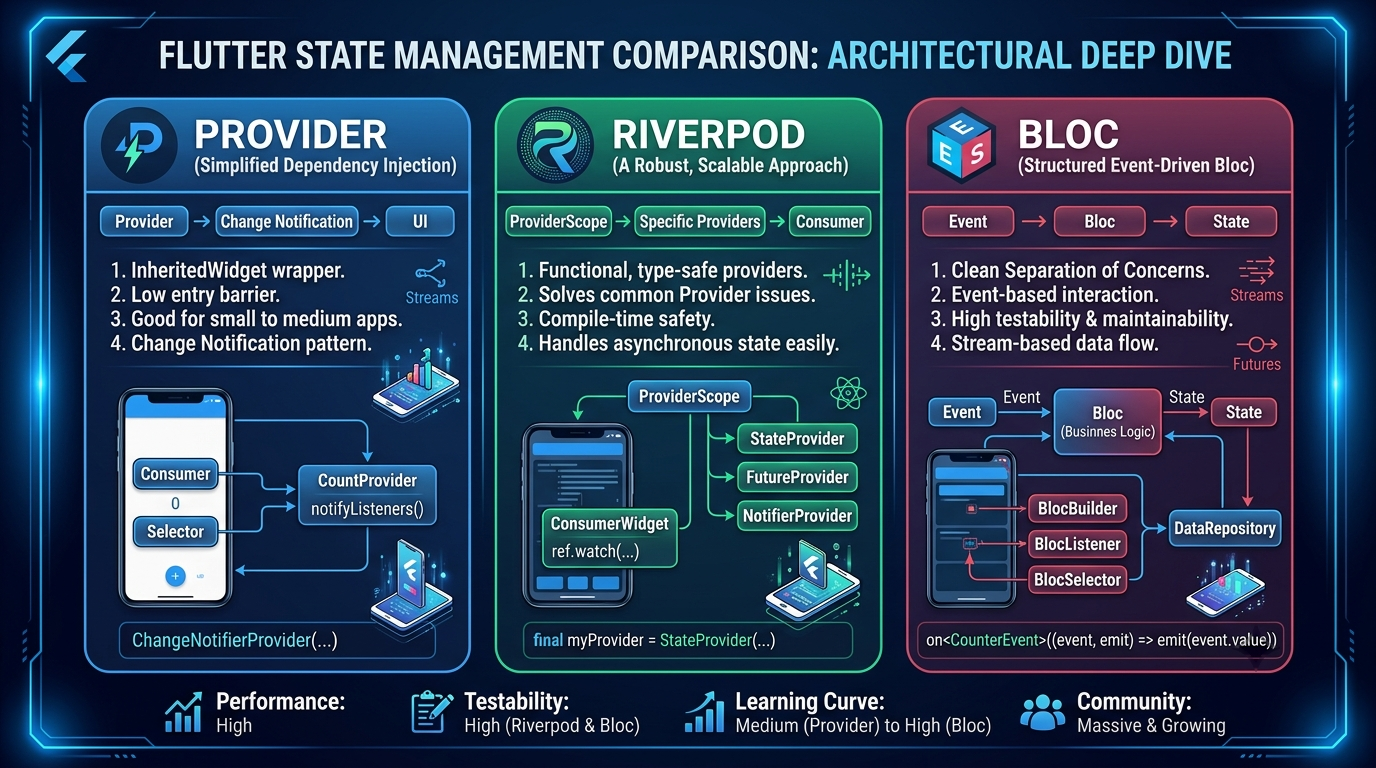
Flutter State Management is one of the first architectural decisions that shapes how a Flutter app grows from a simple prototype into a maintainable product. Flutter’s own documentation highlights that state often needs to be shared across screens and app features, which is exactly where ad hoc setState() usage starts to break down in real projects .
For beginner Flutter developers, state management usually becomes painful at the same moment: the UI works, but changes are hard to track, widgets rebuild unexpectedly, and features begin to depend on each other in fragile ways. This is why the debate around Provider vs Riverpod vs Bloc matters so much in day-to-day Flutter development, especially for freelancers, startup teams, and mobile engineers building apps that need to survive beyond version one.
This guide explains what state management means in Flutter, how Provider, Riverpod, and Bloc work, where each one shines, and which solution makes the most sense in 2026 depending on your project size and team setup. The goal is not to crown a universal winner. The goal is to help developers choose a tool that fits their architecture, team skill level, and delivery pressure.
Introduction
State management matters because Flutter is declarative. The UI is a function of state, so when state changes, the framework rebuilds the necessary widgets. That sounds simple, but in real apps state exists at different layers: text field values, API loading states, cart items, authenticated users, pagination, theme mode, and feature flags. Once those pieces start interacting, unmanaged state quickly turns into hidden bugs and difficult-to-reason-about code .
Beginners often make three mistakes early:
They keep too much logic inside widgets.
They pass values through multiple widget layers just to reach one child.
They pick a package because it is trending, not because it matches their project needs.
Choosing the right solution matters because state management affects more than rebuilds. It changes folder structure, testing strategy, onboarding speed, architecture boundaries, and how easy it is for a team to add features without breaking older ones. A small habit tracker app and a banking app do not need the same level of ceremony.
What is State Management in Flutter?
State management is the process of storing, updating, and distributing data so the UI stays in sync with business logic. In Flutter, this includes everything from a selected tab index to asynchronously loaded product lists.
A practical way to think about state is to split it into four common categories:
UI State
UI state is short-lived and mostly visual. Examples include whether a password is visible, which tab is selected, whether a dropdown is open, or which page is active in a PageView.
This state is usually local to one widget or one screen and can often stay inside StatefulWidget with setState().
class PasswordField extends StatefulWidget {
const PasswordField({super.key});

@override
State<PasswordField> createState() => _PasswordFieldState();
}

class _PasswordFieldState extends State<PasswordField> {
bool obscure = true;

@override
Widget build(BuildContext context) {
return TextField(
obscureText: obscure,
decoration: InputDecoration(
suffixIcon: IconButton(
icon: Icon(obscure ? Icons.visibility : Icons.visibility_off),
onPressed: () => setState(() => obscure = !obscure),
),),);
}
}
Local State
Local state belongs to a feature or screen, not necessarily the whole app. A checkout form, a filter panel, or a create-post wizard may need local business logic shared by several widgets inside one module.
This is often where developers begin moving from raw setState() to Provider, Riverpod, or Bloc.
Global State
Global state is shared across multiple screens or flows. Examples include authenticated user data, selected language, theme mode, shopping cart contents, and app-wide permissions.
This type of state benefits from a centralized and predictable pattern because many parts of the app depend on it.
App State
App state is the broader umbrella that includes cached network responses, repositories, session information, feature toggles, and domain-specific business rules. In production apps, app state usually interacts with services, local storage, APIs, and navigation.
This is where architecture matters. The bigger the app becomes, the more state management must support clean boundaries and testability.
Provider
Provider is one of the most widely recognized entry points into Flutter state management. It is commonly used to expose values and listen to changes in the widget tree, often through types such as ChangeNotifier and ValueNotifier .
In practice, Provider is popular because it feels close to Flutter itself. It does not force a dramatic mental shift for developers who already understand widgets and BuildContext. That low barrier is exactly why so many beginners start with it.
What is Provider?
Provider is a dependency injection and state propagation approach built around Flutter’s widget tree. A provider is placed above part of the tree, and descendants read or watch the exposed object.
Most beginner tutorials use ChangeNotifierProvider, where a class extends ChangeNotifier and calls notifyListeners() whenever state changes .
Advantages
Easy to learn for developers already comfortable with widget trees.
Minimal boilerplate for small and medium apps.
Good fit for simple shared state like theme, cart, settings, and forms.
Large amount of community tutorials and examples.
Works well when the team wants a fast solution without heavy abstraction.
Disadvantages
Tight coupling to
BuildContextcan make some flows less ergonomic.Complex apps can become hard to manage when many
ChangeNotifierclasses grow in responsibility.notifyListeners()is broad and easy to misuse.It is easier to accidentally trigger unnecessary rebuilds if the state shape is not carefully designed.
Advanced async workflows and dependency graphs are less elegant than Riverpod.
Best Use Cases
Provider works best for:
Small to medium apps.
Freelancer projects with fast delivery timelines.
Teams with junior Flutter developers.
Apps where business logic is still relatively simple.
Internal dashboards, prototypes, MVPs, admin tools, and simple commerce flows.
Example Code
A realistic Provider example is a cart manager for a small shopping app.
import 'package:flutter/material.dart';
import 'package:provider/provider.dart';

class CartProvider extends ChangeNotifier {
final List<String> _items = [];

List<String> get items => List.unmodifiable(_items);
int get totalItems => _items.length;

void addItem(String item) {
_items.add(item);
notifyListeners();
}

void removeItem(String item) {
_items.remove(item);
notifyListeners();
}
}

void main() {
runApp(
ChangeNotifierProvider(
create: (_) => CartProvider(),
child: const MyApp(),
),
);
}

class MyApp extends StatelessWidget {
const MyApp({super.key});

@override
Widget build(BuildContext context) {
return MaterialApp(
home: Scaffold(
appBar: AppBar(
title: const Text('Shop'),
actions: [
Center(
child: Padding(
padding: const EdgeInsets.all(16),
child: Consumer<CartProvider>(
builder: (_, cart, __) => Text('${cart.totalItems}'),
),
),
),
],
),
body: Column(
children: [
ElevatedButton(
onPressed: () {
context.read<CartProvider>().addItem('Keyboard');
},
child: const Text('Add item'),
),
Expanded(
child: Consumer<CartProvider>(
builder: (_, cart, __) {
return ListView.builder(
itemCount: cart.items.length,
itemBuilder: (_, index) {
final item = cart.items[index];
return ListTile(
title: Text(item),
trailing: IconButton(
icon: const Icon(Icons.delete),
onPressed: () {
context.read<CartProvider>().removeItem(item);
},),);},);
},),),],),),);}}
This approach is clean enough for a small app, but it becomes less pleasant when a single provider starts handling pagination, retries, filtering, optimistic updates, and error recovery.
Riverpod
Riverpod is a more modern approach created to address some of the ergonomic and architectural limitations developers experienced with Provider. Its official documentation emphasizes that providers can store values, be read without relying on widget tree context, and be wrapped in ProviderScope, which stores provider state .
In 2026, Riverpod is often the most balanced option for Flutter teams that want cleaner dependency management than Provider without adopting the full ceremony of Bloc.
What is Riverpod?
Riverpod is a reactive state management and dependency injection framework for Dart and Flutter. It introduces providers as first-class objects rather than just widgets inside the UI tree, which makes state easier to read, override, and test .
Riverpod supports multiple provider types and optional code generation. The official getting-started guide documents Provider, flutter_riverpod, ProviderScope, optional generator packages, and lint tooling to reduce mistakes .
Advantages
Does not depend on
BuildContextto read state.Stronger compile-time safety and cleaner dependency modeling.
Excellent support for async state through patterns like
AsyncValue.Better testability and easier overrides in tests.
Fits clean architecture nicely because providers can represent repositories, use cases, and controllers.
Scales from small apps to large production codebases.
Disadvantages
Slightly steeper learning curve than Provider.
Too many provider types can confuse beginners at first.
Code generation adds power but also extra setup.
Teams without architectural discipline can still create messy provider graphs.
Migration from old Provider-based apps requires planning.
Best Use Cases
Riverpod works especially well for:
Medium to large apps.
Apps with many async flows.
Teams that care about testability.
Developers using clean architecture or feature-first structure.
Startups that need to move fast now without painting themselves into an architectural corner later.
Example Code
Below is a realistic Riverpod example showing Provider, StateNotifierProvider, and AsyncValue in a simple product module.
import 'package:flutter/material.dart';
import 'package:flutter_riverpod/flutter_riverpod.dart';

final productRepositoryProvider = Provider<ProductRepository>((ref) {
return ProductRepository();
});

class Product {
final String id;
final String name;

Product({required this.id, required this.name});
}

class ProductRepository {
Future<List<Product>> fetchProducts() async {
await Future.delayed(const Duration(seconds: 1));
return [
Product(id: '1', name: 'Mechanical Keyboard'),
Product(id: '2', name: 'Wireless Mouse'),
];
}
}

class CartNotifier extends StateNotifier<List<Product>> {
CartNotifier() : super([]);

void add(Product product) {
state = [...state, product];
}

void remove(Product product) {
state = state.where((item) => item.id != product.id).toList();
}
}

final cartProvider = StateNotifierProvider<CartNotifier, List<Product>>((ref) {
return CartNotifier();
});

final productsProvider = FutureProvider<List<Product>>((ref) async {
final repository = ref.watch(productRepositoryProvider);
return repository.fetchProducts();
});

void main() {
runApp(const ProviderScope(child: MyApp()));
}

class MyApp extends StatelessWidget {
const MyApp({super.key});

@override
Widget build(BuildContext context) {
return const MaterialApp(home: ProductPage());
}
}

class ProductPage extends ConsumerWidget {
const ProductPage({super.key});

@override
Widget build(BuildContext context, WidgetRef ref) {
final productsAsync = ref.watch(productsProvider);
final cart = ref.watch(cartProvider);

return Scaffold(
appBar: AppBar(
title: const Text('Products'),
actions: [
Padding(
padding: const EdgeInsets.all(16),
child: Center(child: Text('${cart.length}')),
),
],
),
body: productsAsync.when(
data: (products) => ListView.builder(
itemCount: products.length,
itemBuilder: (_, index) {
final product = products[index];
return ListTile(
title: Text(product.name),
trailing: IconButton(
icon: const Icon(Icons.add_shopping_cart),
onPressed: () => ref.read(cartProvider.notifier).add(product),
),
);
},
),
loading: () => const Center(child: CircularProgressIndicator()),
error: (error, stack) => Center(child: Text('Error: $error')),
),
);
}
}
This example reflects why Riverpod feels comfortable in real apps: dependencies are explicit, async state is modeled cleanly, and business logic can move out of widgets without excessive ceremony.
Bloc
Bloc, often used through the flutter_bloc package, is built around the idea that events go in and states come out. The package documentation describes it as a way to integrate blocs and cubits into Flutter and notes that it is built to work with the core bloc package .
Bloc is often chosen by teams that prioritize predictability, explicit state transitions, and a strong separation between presentation and business logic.
What is Bloc?
Bloc stands for Business Logic Component. In a typical Bloc setup, the UI dispatches an event, the bloc processes that event, and the bloc emits a new state. This pattern creates a highly traceable flow that is useful in large systems and collaborative teams .
Many teams also use Cubit, a lighter Bloc variant, but when people compare Provider vs Riverpod vs Bloc, they usually mean the broader Bloc ecosystem and its event-state mindset.
Advantages
Very predictable state transitions.
Excellent for large teams and complex workflows.
Strong separation of concerns.
Good testability for business logic.
Explicit events and states help during debugging and onboarding.
Fits enterprise conventions and layered architectures well.
Disadvantages
More boilerplate than Provider and often more than Riverpod.
Steeper learning curve for beginners.
Can feel heavy for simple apps.
Overengineering is common in small products.
Development speed may slow down when the team only needs lightweight state updates.
Best Use Cases
Bloc is a strong fit for:
Large apps with many developers.
Enterprise products with strict architecture rules.
Complex workflows such as multi-step forms, offline sync, or advanced permissions.
Teams that value explicit, reviewable state transitions.
Projects where maintainability and predictability matter more than quick prototyping.
Example Code
A simple login flow shows the event-state pattern clearly.
import 'package:flutter/material.dart';
import 'package:flutter_bloc/flutter_bloc.dart';

abstract class LoginEvent {}

class LoginSubmitted extends LoginEvent {
final String email;
final String password;

LoginSubmitted({required this.email, required this.password});
}

abstract class LoginState {}

class LoginInitial extends LoginState {}
class LoginLoading extends LoginState {}
class LoginSuccess extends LoginState {}
class LoginFailure extends LoginState {
final String message;
LoginFailure(this.message);
}

class LoginBloc extends Bloc<LoginEvent, LoginState> {
LoginBloc() : super(LoginInitial()) {
on<LoginSubmitted>((event, emit) async {
emit(LoginLoading());

await Future.delayed(const Duration(seconds: 1));

if (event.email == 'test@mail.com' && event.password == '123456') {
emit(LoginSuccess());
} else {
emit(LoginFailure('Invalid credentials'));
}
});
}
}

void main() {
runApp(
BlocProvider(
create: (_) => LoginBloc(),
child: const MyApp(),
),
);
}

class MyApp extends StatelessWidget {
const MyApp({super.key});

@override
Widget build(BuildContext context) {
return const MaterialApp(home: LoginPage());
}
}

class LoginPage extends StatelessWidget {
const LoginPage({super.key});

@override
Widget build(BuildContext context) {
final emailController = TextEditingController();
final passwordController = TextEditingController();

return Scaffold(
appBar: AppBar(title: const Text('Login')),
body: Padding(
padding: const EdgeInsets.all(16),
child: BlocConsumer<LoginBloc, LoginState>(
listener: (context, state) {
if (state is LoginSuccess) {
ScaffoldMessenger.of(context).showSnackBar(
const SnackBar(content: Text('Login successful')),
);
}
if (state is LoginFailure) {
ScaffoldMessenger.of(context).showSnackBar(
SnackBar(content: Text(state.message)),
);
}
},
builder: (context, state) {
return Column(
children: [
TextField(controller: emailController),
TextField(controller: passwordController, obscureText: true),
const SizedBox(height: 16),
ElevatedButton(
onPressed: state is LoginLoading
? null
: () {
context.read<LoginBloc>().add(
LoginSubmitted(
email: emailController.text,
password: passwordController.text,
),
);
},
child: state is LoginLoading
? const CircularProgressIndicator()
: const Text('Login'),
),],);},),),);}}
For a login screen, this may already feel more structured than Provider, but the same structure becomes a major advantage in larger domains like payments, order tracking, or compliance-heavy flows.
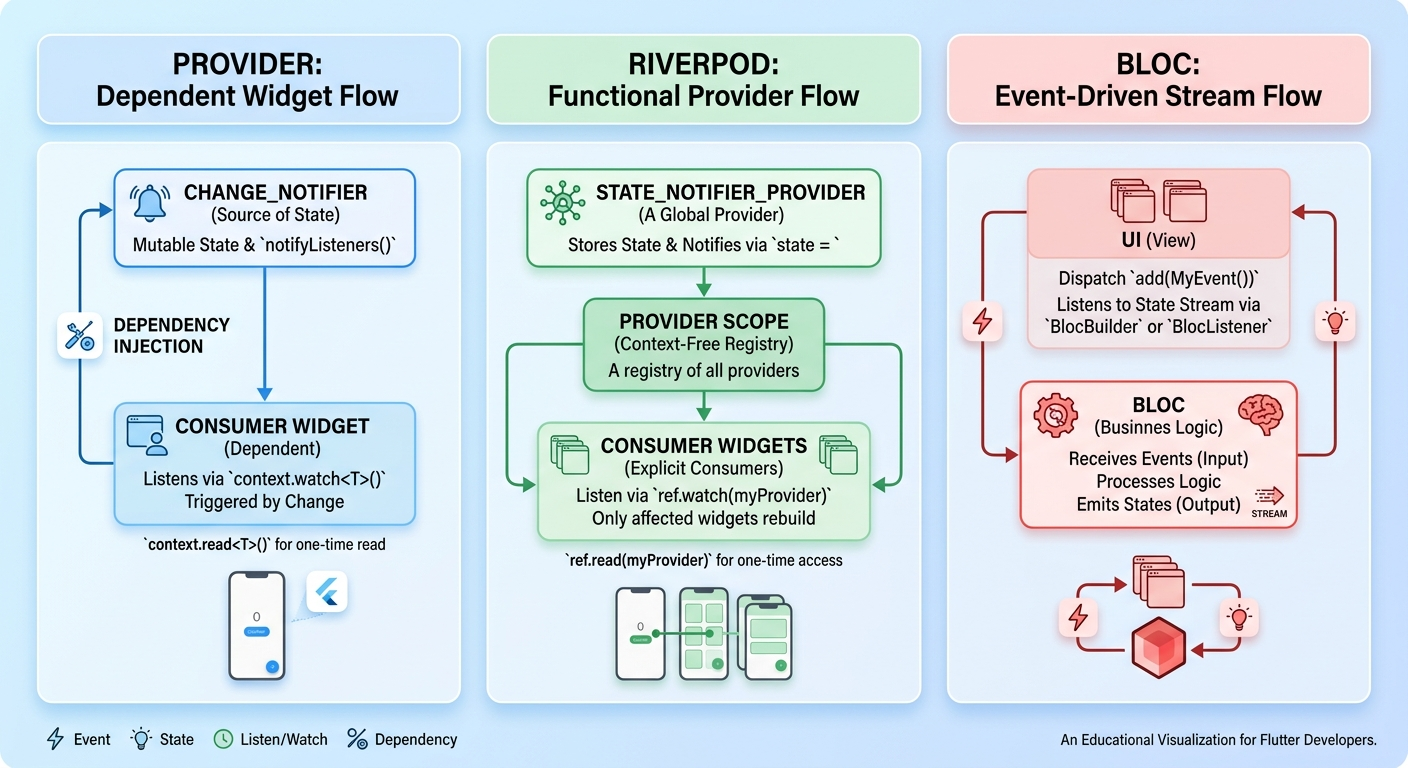
Provider vs Riverpod vs Bloc
The real comparison is not about which package is universally best. It is about trade-offs between simplicity, scalability, explicitness, and development speed.
Feature comparison table
Feature | Provider | Riverpod | Bloc |
|---|---|---|---|
Core idea | Widget-tree based dependency and state access | Provider-based reactive system with stronger dependency modeling | Event-to-state architecture with explicit transitions |
Beginner friendliness | High | Medium | Low to medium |
Boilerplate | Low | Low to medium | High |
Async handling | Basic to moderate | Strong, especially with | Strong, but usually more verbose |
Testability | Moderate | High | High |
| Common | Not required for reading providers | Used in UI integration, not for core state logic |
Code organization | Simple at first, can get messy later | Flexible and scalable | Highly structured |
Best team size | Solo to small team | Solo to mid-size and large teams | Mid-size to large teams |
Architecture fit | Good for simple layers | Very strong for clean architecture | Very strong for layered enterprise architecture |
Ideal app complexity | Small to medium | Medium to large | Large and enterprise |
Learning curve table
Criteria | Provider | Riverpod | Bloc |
|---|---|---|---|
Time to first useful app | Fast | Fast to moderate | Moderate |
Concepts to learn | Low | Medium | High |
Common beginner confusion |
| Provider types, | Events, states, mapping logic, folder structure |
Long-term maintainability learning payoff | Medium | High | High |
Best for teaching Flutter fundamentals | Yes | Yes, after basics | Usually later |
Project suitability table
Project Type | Best Choice | Why |
|---|---|---|
Small app | Provider | Fast setup, low boilerplate, enough for limited state |
Medium app | Riverpod | Better scaling, async support, cleaner dependencies |
Large app | Riverpod or Bloc | Riverpod for balanced speed, Bloc for stricter control |
Enterprise app | Bloc | Predictable flows, explicit architecture, team-friendly reviews |
Startup MVP | Provider or Riverpod | Provider for speed, Riverpod for safer growth path |
Solo freelance project | Provider or Riverpod | Depends on delivery pressure and expected feature growth |
Detailed comparison
Learning Curve
Provider is easiest to learn because it feels close to standard Flutter widget composition. Riverpod introduces new mental models, but most developers adapt quickly after a few days of use. Bloc has the highest upfront cost because developers must understand events, states, transitions, and architectural separation.
Scalability
Provider scales acceptably for smaller codebases, but large apps often accumulate oversized ChangeNotifier classes. Riverpod scales better because dependencies are more explicit and async state is modeled more cleanly. Bloc also scales well, especially in teams where formal patterns and code review standards matter.
Performance
All three can perform well when implemented correctly. Performance problems usually come from poor rebuild boundaries, oversized state objects, or too much logic in the UI layer rather than from the library itself.
Boilerplate
Provider has the least boilerplate. Riverpod adds some structure without becoming too heavy. Bloc has the most boilerplate, although this verbosity can improve clarity in complex business flows.
Testability
Provider is testable, but many teams end up coupling too much logic to widgets. Riverpod is excellent for tests because providers can be overridden and state access is explicit . Bloc is also very testable thanks to its event-to-state flow and isolated business logic.
Community Support
Provider has extensive historical adoption and many tutorials . Riverpod has strong momentum, official docs, and tooling such as linting and generator support . Bloc remains deeply respected in professional teams and has mature package documentation .
Clean Architecture Compatibility
Riverpod and Bloc both fit clean architecture well. Riverpod feels more flexible for modern Flutter apps where repositories, use cases, and controllers are expressed as providers. Bloc fits especially well when the team wants strict presentation-domain-data boundaries and explicit event-driven flows.
Enterprise Readiness
Provider is usually not the first choice for enterprise-scale systems unless the domain is still relatively simple. Riverpod is increasingly viable for serious production systems. Bloc remains the safest default for organizations that value formal structure and traceable state transitions.
Team Collaboration
Provider is fine for small teams, but conventions can drift. Riverpod improves collaboration by making dependencies clearer. Bloc is strongest when multiple developers need predictable patterns and consistent code review expectations.
Code Maintainability
Provider code stays maintainable when state is modest and well-scoped. Riverpod offers a strong balance between readable code and architectural discipline. Bloc can be the most maintainable in large systems, but only if the team accepts the added ceremony.
Real Project Recommendations
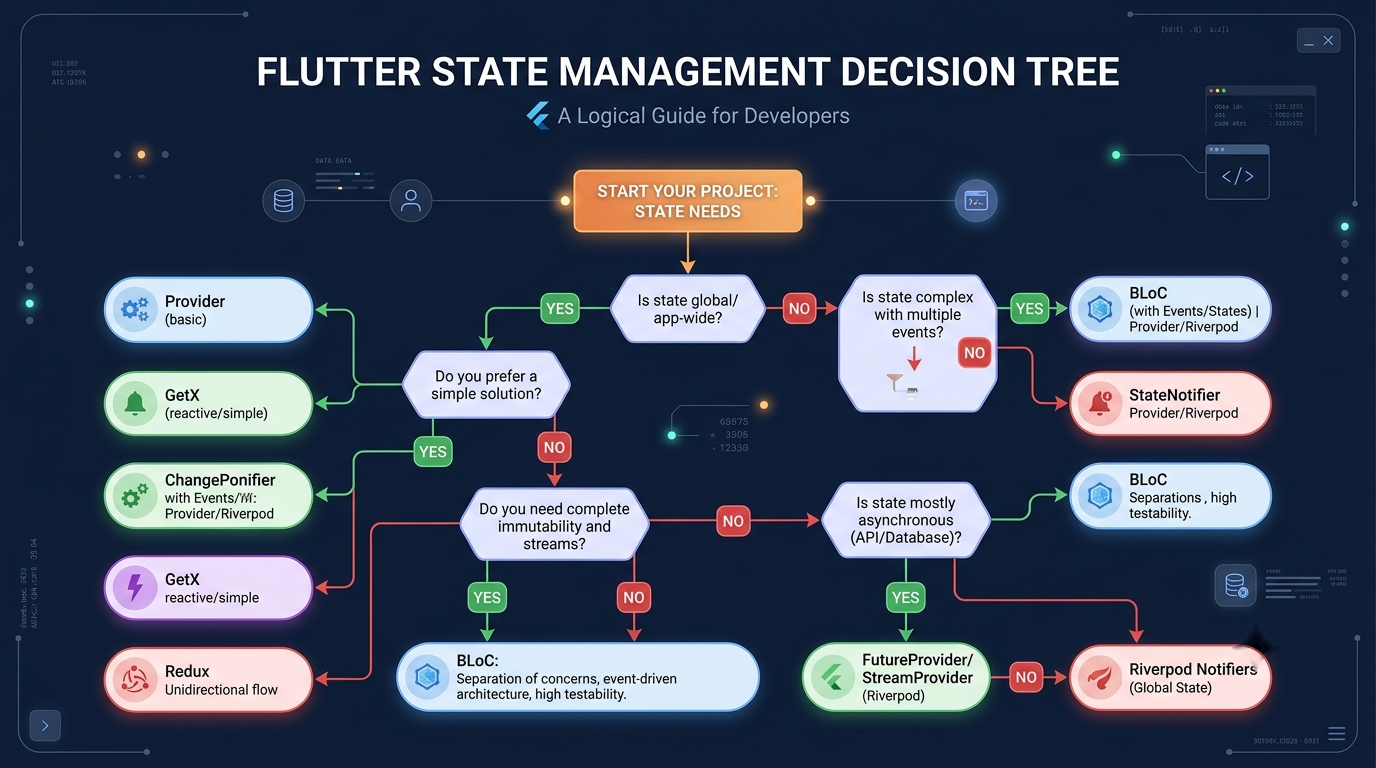
Choosing the best state management solution depends less on trends and more on project pressure, scope, and team composition.
Small Apps → Provider
For small apps, Provider is usually enough. It is fast to implement, easy to teach, and well suited for apps with limited shared state such as calculators, note apps, appointment tools, portfolio apps, or small dashboards.
Medium Apps → Riverpod
For medium apps, Riverpod is usually the strongest recommendation. At this size, projects often need async loading, dependency injection, reusable modules, and easier testing. Riverpod gives those benefits without forcing as much ceremony as Bloc.
Large Apps → Riverpod or Bloc
Large apps sit in the middle. If the team wants speed and modern ergonomics, Riverpod is often the better fit. If the app has complex workflows, many engineers, or compliance-heavy flows, Bloc becomes more attractive because explicit event and state transitions make code reviews safer.
Enterprise Apps → Bloc
Enterprise teams generally benefit from Bloc’s predictability. When product domains involve approvals, auditing, multi-step processes, permissions, and many integrations, explicit transitions pay off over time.
Startup MVPs → Provider or Riverpod
For startup MVPs, the answer depends on expected growth. Provider is perfect when the goal is validating an idea fast. Riverpod is the better choice when the MVP may evolve quickly into a full product and the team wants to avoid a painful rewrite.
Performance Considerations
State management packages do not magically make apps fast. They only provide patterns. Performance still depends on how carefully developers scope rebuilds, split widgets, and model state.
Widget rebuilds
A common mistake is watching too much state in a high-level widget. In Provider, this often happens with wide Consumer usage or broad notifyListeners(). In Riverpod, watching large providers at the wrong level can still trigger unnecessary rebuilds. In Bloc, rebuilding entire pages on every state change can waste rendering work.
The fix is simple in principle: make state granular and watch only what the widget needs.
Memory usage
Memory problems usually come from retaining large objects, caches, streams, or controllers longer than necessary. Bloc and Riverpod both encourage more deliberate lifecycle handling, but poor repository design can still leak memory regardless of package.
Developer productivity
Provider wins short-term productivity. Riverpod often wins medium-term productivity because refactoring is cleaner. Bloc can reduce long-term risk in large teams, but its upfront cost is real.
Testing
Testing is where architecture choices start paying back. Riverpod’s provider overrides and explicit dependency graphs are excellent for unit and widget testing . Bloc’s event-state pattern also makes it straightforward to test transitions in isolation .
Which One Should You Learn in 2026?
The best answer in 2026 is not “only one.” It is “learn in sequence.”
For Beginners
Start with Provider to understand shared state, rebuilds, dependency injection basics, and how UI reacts to state changes. Then move to Riverpod once those fundamentals feel natural. Jumping straight into Bloc is possible, but many beginners end up memorizing syntax instead of understanding state flow.
For Freelancers
Learn Provider and Riverpod first. Provider helps ship small client apps quickly. Riverpod helps when clients ask for version two, API-heavy modules, dashboards, subscriptions, and maintainable scaling.
For Startups
Riverpod is usually the best first serious choice. It keeps the team productive without leaving architecture entirely informal. Bloc can still make sense for startup teams working on operationally complex products from day one.
For Enterprise Teams
Learn Bloc deeply, then understand Riverpod as well. Many enterprise teams value the traceability and explicitness of Bloc, but Riverpod is becoming increasingly relevant for teams that want modern Dart ergonomics with strong structure.
Common Mistakes
Here are 10 common mistakes developers make when using Flutter state management:
Storing everything in one giant provider, notifier, or bloc.
Mixing UI logic, API calls, and domain rules in the same class.
Triggering rebuilds too high in the widget tree.
Using global state for values that should stay local.
Choosing Bloc for a tiny app and creating unnecessary complexity.
Choosing Provider for a large app without planning modular architecture.
Ignoring loading and error states in async flows.
Mutating state directly instead of creating predictable updates.
Skipping tests because the architecture “looks simple.”
Naming state classes poorly, making transitions hard to understand.
A bonus mistake appears often in freelance work: copying a tutorial architecture into a production app without adjusting it for the product’s actual complexity.
Best Practices
The following practices improve results regardless of package choice:
Keep widgets dumb when possible; move business rules out of the UI.
Prefer small, focused state units over giant feature managers.
Model loading, success, and error states explicitly.
Separate data, domain, and presentation concerns when the app starts growing.
Write tests for business logic before the project becomes difficult to refactor.
Avoid package-driven architecture; let product complexity decide the pattern.
Use feature-based folders to reduce navigation cost in large codebases.
Review rebuild boundaries whenever performance issues appear.
Keep asynchronous dependencies explicit.
Document state flow for onboarding and team collaboration.
A practical rule works well in real projects: when one state object starts handling too many responsibilities, split it before it becomes the reason every feature takes longer to ship.
Internal Linking Opportunities
Suggested internal links for bidev.site:
Flutter Performance Optimization
Firebase Authentication Guide
FAQ
1. What is the best Flutter state management solution for beginners?
Provider is usually the easiest starting point because it has low boilerplate and maps well to Flutter’s widget model. Riverpod is the next best step once the basics of shared state and rebuild control are clear.
2. Is Riverpod better than Provider in Flutter?
Riverpod is often better for medium and large apps because it offers cleaner dependency management, better testability, and strong async patterns. Provider is still excellent for simpler apps and faster onboarding.
3. Is Bloc outdated in 2026?
No. Bloc remains a strong choice for large teams, enterprise apps, and projects that benefit from explicit event-to-state architecture . It is not outdated; it is simply more structured than many smaller apps need.
4. Which state management is best for Flutter clean architecture?
Riverpod and Bloc are both strong fits. Riverpod feels more flexible and lightweight, while Bloc feels stricter and more formal.
5. Should a small Flutter app use Bloc?
Usually no. Small apps often do better with Provider or Riverpod because the development speed is higher and the boilerplate is lower.
6. What is the difference between Provider and Riverpod?
Provider is closely tied to the widget tree and often uses BuildContext, while Riverpod models dependencies more explicitly and does not require context to read providers . That difference improves testability and architectural flexibility.
7. What is the difference between Riverpod and Bloc?
Riverpod is a reactive provider system with flexible patterns, while Bloc is an explicit event-state architecture. Riverpod tends to be more ergonomic, while Bloc tends to be more formal.
8. Which state management is best for freelance Flutter projects?
Provider is best when speed matters most and app complexity is modest. Riverpod is better when the client project is likely to grow after launch.
9. Can a Flutter app use more than one state management solution?
Yes, but it should be done carefully. Mixed patterns can work during migration or in layered systems, but too many patterns in one codebase often confuse the team.
10. What should Flutter developers learn first in 2026?
Learn local state with setState(), then Provider, then Riverpod, and finally Bloc. That order builds understanding instead of overwhelming beginners with ceremony.
Conclusion
Provider, Riverpod, and Bloc are all valid tools for Flutter State Management. Provider is the simplest and fastest to adopt, Riverpod offers the best balance for most modern apps, and Bloc remains the strongest choice when teams need explicit structure, predictable workflows, and enterprise-ready patterns .
For most developers in 2026, the practical recommendation is clear: start with Provider to understand the fundamentals, use Riverpod for most real-world production apps, and reach for Bloc when the team, domain, or architecture demands stronger formality. The best state management solution is the one that keeps the codebase understandable six months after launch, not just the one that looks elegant in a tutorial.
// tagged in
Related Articles
Skip the boilerplate
Production-ready Flutter starter kit with Firebase Auth, Firestore, Cloud Functions, push notifications, and Clean Architecture — ship your app in days, not months.
Did this article save you time?
I write these for free. If it helped, a coffee keeps me going — and more articles coming.